lunes, 5 de mayo de 2008

DUNDi Enterprise Configuration SIP

This is all you should need to setup DUNDi between two boxes with SIP.
You can add more boxes to your network in a similar way.

(Based on configurations in the configs directory of the Asterisk source code and documents published by Brian K. West aka bkw_)
DUNDi Enterprise Configuration IAX

Note: This configuration is currently non-functional, as chan_sip does not support "dbsecret" at this time. You can create a configuration where the passwords are actually included in the DUNDi mappings or in the peer definitions. A patch to support dbsecret in chan_sip is forthcoming (for CVS HEAD only).

Things to keep in mind:
  • Unless you have specifically listed a host in your sip.conf the call will come in on the context defined in the [general] section by context. You may want to include the [dundi-priv-local] in this context.


On both boxes in your extensions.conf:
; Private DUNDi network
[dundi-priv-canonical]
; Direct numbers

[dundi-priv-customers]
; If you are an ITSP or Reseller, list your customers here.

[dundi-priv-via-pstn]
; If you are freely delivering calls to the PSTN, list them here

[dundi-priv-local]
include => dundi-priv-canonical
include => dundi-priv-customers
include => dundi-priv-via-pstn

[dundi-priv-switch]
; Just a wrapper for the switch
switch => DUNDi/priv

[dundi-priv-lookup]
include => dundi-priv-local
include => dundi-priv-switch

[macro-dundi-priv]
exten => s,1,Goto(${ARG1},1)
include => dundi-priv-lookup


sip.conf on both boxes:
[priv]
type=user
dbsecret=dundi/secret
context=dundi-priv-local


dundi.conf on both boxes under mappings:
In many cases you will need to replace ${IPADDR} with your local IP address
priv => dundi-priv-canonical,0,SIP,${IPADDR}/${NUMBER},nopartial
priv => dundi-priv-customers,100,SIP,${IPADDR}/${NUMBER},nopartial
priv => dundi-priv-via-pstn,400,SIP,${IPADDR}/${NUMBER},nopartial


now on each box cd /var/lib/asterisk/keys

astgenkey -n BOXNAMEHERE

Press enter do not put a password on the keys unless you want to init
keys every time you start asterisk.

Now put exchange public keys between the boxes.


Box A dundi.conf:
[DE:AD:BE:EF:DE:AD]   <-- EID/MAC from BOX B model = symmetric host = boxb.domain.com inkey = BOXB   <- BOX B's public key outkey = BOXA  <- BOX A's private key include = priv permit = priv qualify = yes order = primary 


Box B dundi.conf:

[BE:EF:DE:AD:BE:EF]  <-- EID/MAC from BOX A model = symmetric host = boxa.domain.com inkey = BOXA   <- BOX A's public key outkey = BOXB  <- BOX B's private key include = priv permit = priv qualify = yes order = primary 


Now you can do this in the context which your devices dialout:
exten => _91NXXNXXXXXX,1,Macro(dundi-priv,${EXTEN:1})
exten => _91NXXNXXXXXX,2,Dial(Zap/g1/${EXTEN:1}) ; This is fall through example to a PSTN such a as PRI


And find numbers in your enterprise DUNDi network.

These same things apply to the e164 DUNDi network too.


http://www.voip-info.org/wiki/view/DUNDi+Enterprise+Configuration+SIP


DUNDi Enterprise Configuration SIP with no passwords

http://www.voip-info.org/wiki/view/DUNDi+Enterprise+Configuration+SIP+with+no+passwords


DUNDi Enterprise Configuration IAX

http://www.voip-info.org/wiki/view/DUNDi+Enterprise+Configuration+IAX

martes, 22 de abril de 2008

Callback for Asterisk

Callback script made to do callback if called channel is busy,

How it works

  • If called channel or phone is busy, it will ask to press 5 for callback or any other key to leave voicemail,
  • Upon pressing 5, it will create a callfile in /var/spool/asterisk/outgoing with a special channel to be called
  • Channel provided in callfile will periodically check if the extension set to callback is busy or available. as soon as it finds the channel available it will try to establish the call.

Php Agi script

#!/usr/bin/php -q
1;

$err=fopen("php://stderr","w");
$in = fopen("php://stdin","r");
while (!feof($in)) {
$temp = str_replace("\n","",fgets($in,4096));
$s = split(":",$temp);
$agi[str_replace("agi_","",$s0)] = trim($s1);
if (($temp == "") || ($temp == "\n")) {
break;
}
}
$cf = fopen("/var/spool/asterisk/outgoing/cb" . $agi"callerid" . $to,"w+");
fputs($cf,"Channel: LOCAL/cb".$agi"callerid".$to."\n");
fputs($cf,"Context: default\n");
fputs($cf,"Extension: ".$to."\n");
fputs($cf,"CallerID: CB ".$agi"callerid"."<".$agi"callerid"."> \n");
fputs($cf,"MaxRetries: 100\n");
fputs($cf,"RetryTime: 30\n");
fclose($cf);
fclose($in);
fclose($err);
?>

Extensions.conf

  • in extensions.conf add something like this
exten => s-BUSY,1,ChanIsAvail(SIP/${MACRO_EXTEN}|s)
exten => s-BUSY,2,GotoIf($"${AVAILSTATUS}"<="1"?s-NOANSWER,1)
exten => s-BUSY,3,Read(digit|callback|1)
exten => s-BUSY,4,Gotoif($ "${digit}" = "5"?callback,1:5)
exten => s-BUSY,5,Voicemail(${MACRO_EXTEN},b)
exten => s-BUSY,6,Hangup

exten => callback,1,AGI(callback|${MACRO_EXTEN})
exten => callback,2,Hangup

;in cbXXXXXX first three digits are FROM exten and last ones are TO exten
;this exten is used by CALL FILE, logic for this is to make sure extension we are calling is IDLE or NOT_INUSE state.

exten => _cbXXXXXX,1,Set(FROM=${EXTEN:2:3})
exten => _cbXXXXXX,2,Set(TO=${EXTEN:5:3})
exten => _cbXXXXXX,3,ChanIsAvail(SIP/${TO}|s)
exten => _cbXXXXXX,4,GotoIf($"${AVAILSTATUS}" <= "1"?5:7)
exten => _cbXXXXXX,5,Set(CALLERID(all)="CB ${TO} <${TO}>")
exten => _cbXXXXXX,6,Dial(SIP/${FROM}|10)
exten => _cbXXXXXX,7,Hangup


  • Copy Callback script in agi-bin directory.
  • Copy callback.gsm in /var/lib/asterisk/sounds/ -

martes, 15 de abril de 2008

APSTEL Visual Dialplan v1.3, now with SSH and include

The latest Visual Dialplan v1.3 for Asterisk® bring commodity of a modern desktop rapid application development platform into the world of Linux and Asterisk dialplan development.

With Visual Dialplan you can deploy Asterisk Dialplan with a single press of a button using integrated SSH client directly from your Windows or Linux desktop, or include your existing Asterisk dialplan code created in a traditional way into the Visual Dialplan.

You can even continue developing part of the code in a traditional way, or reuse already developed dialplan code using Custom Component.

Visual Dialplan for Asterisk is innovative visual modeling platform that enables Asterisk users to create, maintain and validate Asterisk dialplans in an easy, convenient and natural way. Simply drag, drop and connect dialplan blocks to make company IVR, Call Center queues, inbound or outbound call flows and much more. Model, don't code!

Full functional, free of charge trial version is available for download. Just follow the links below to download the trial or to learn more.


viernes, 7 de marzo de 2008

Asterisk phone xten eyeBeam - How to configure video calls with Xten eyeBeam through Asterisk

History
Xten eyeBeam is one of a few SIP soft-video-phones on the market. Starting with release 1.1 3004t (16741), video calls work well with Asterisk HEAD 02/25/2005.
Update: Asterisk CVS HEAD 03/05/2005 now supports pass-thru video calls with h.263p codec between eyeBeams (potentially other video clients supporting H.263+).
General configuration See a good section here for configuring Xten X-lite, which is similar.


Video Configuration

In your sip.conf:
[general]
videosupport=yes ; enable Asterisk video support
[101] type=friend
username=101
secret=hidden
host=dynamic
context=internal
callerid=Video Phone <101>
disallow=all ; better for custom-tunning codec selection
allow=ulaw
allow=alaw
allow=gsm
allow=h263 ; H.263 is our video codec
allow=h263p ; H.263p is the enhanced video codec
dtmfmode=rfc2833 ; inband is not supported in compressed codecs like gsm, so we better set it to rfc2833
canreinvite=no ; canreinvite must be set to 'no'


TrixBox

There is a slight difference in configuring video conferencing working for TrixBox and it is as follows:
in your sip.conf:
[general]
videosupport=yes ; enable Asterisk video support

in your sip_additional.conf, (same as above):
[101] type=friend
username=101
secret=hidden
host=dynamic
context=internal
callerid=Video Phone <101>
disallow=all ; better for custom-tunning codec selection
allow=ulaw
allow=alaw
allow=gsm
allow=h263 ; H.263 is our video codec
allow=h263p ; H.263p is the enhanced video codec
dtmfmode=rfc2833 ; inband is not supported in compressed codecs like gsm, so we better set it to rfc2833
canreinvite=no ; canreinvite must be set to 'no'

By doing this you will find that video conferencing works for both extensions whereas if you implemented the above configuration you would find one or both extensions are unable to send or receive video. By inserting the above script in the sip_additional.conf file you will see that the extensions you enter will appear in FreePBX/AMP along with your other extensions.


Other prep

1. Download the latest release eyeBeam 1.11 3004w. For latest news and changelog see the thread on Xten website.


Making the video-call

1. Start eyeBeam
2. Configure SIP subscription information / calibrate audio/video input.
3. Make sure phone registered ok. Also, you should see your own video in the video 'drawer.'
4. Dial another eyeBeam user.
5. Click "Start video" button (the one in upper-left corner next to the "wrench").
6. Bingo!

lunes, 18 de febrero de 2008

PBX Screen Popper

http://www.codesonics.com

En este link se encuentra la version 1.5.0 disponible para bajar (trial de 30 dias).
Cada licencia cuesta U$S 15 (para mas de 50 licencias)

* Opens a web page to a specified URL when you receive a phone call to your Asterisk extension.
* Use all or part of the CallerID as a formfield in the URL
* Specify conditions under which the page is opened
* Uses the Asterisk Manager API
* Opens page on answer, ring or when asked
* Open page for any CallerID or if matched to a specific value, starts with, contains or ends with a specific value
* Allows you to strip characters from the start or end of CallerID

martes, 12 de febrero de 2008

AsteriskMonitor - Current: version 3 beta

http://www.asteriskmonitor.org/

AsteriskMonitor is a FREE powerful software completely written in Java and distributed under the GPL license. AsteriskMonitor pretends to be a bridge between Asterisk and any Java-based application trying to get statistics and data from the asterisk server.

AsteriskJavaEye is a FREE web-based java application, released under the GPL license too, that connects to AsteriskMonitor and shows you what's happening NOW in your Asterisk server: who is connected to which queues, for how long today, how many calls has he/she answered, is it ringing now, etc.

AsteriskJavaStat is a FREE web-based java module for AsteriskJavaEye, released under the GPL as well, that allows you to view formatted statistics from your PBX. AsteriskJavaStat won't read the CDR; it uses the AsteriskMonitor's statistic database, which is easier to read and mantain than the CDR.

Features:

  • Automatic recognition of any kind of generic event (login/logout of agents, joining/leaving queues, new calls, voicemails, recordings, dials, transfers, etc)

  • Real-time updated data-model of Asterisk's state on the server
  • Server accesible trought RMI, with an open API that allows you just to deal with Terminals, Agents, Calls, Queues, etc, as Java objects.
  • Expandable: You can easily develope new modules for AsteriskMonitor, to recognize new kinds of events for your own profit. You just need to write it in Java, compile your single .java file and leave it in the right directory. AsteriskMonitor will load it dinamycally and start using it in seconds. No compile or restart needed.
  • Inverse mode: you can also modify Asterisk's state, adding agents to queues, reloading config files, restarting Asterisk, etc.
  • Works over the Asterisk's Manager Api interface. It has got an integrated connection-repeater system, which will open as many new Manager Api ports as you want, allowing you to connect multiple programs to Asterisk trought AsteriskMonitor, Asterisk won't even notice about it.
  • Includes a web application (AsteriskJavaEye) you can deploy on any Tomcat engine, which will connect to AsteriskMonitor trought RMI and allow you to see any statistical data you need about your agents, and will let you add/remove them from queues, connect/disconnect them, etc.
  • All the system is 100% Java-Based and independent on the machine. You can have Asterisk working in a PC and run AsteriskMonitor + AsteriskJavaEye in any other one.
  • Reliable CDR: AsteriskMonitor can register its own CDR, with detailed, exact and well-documented information about call times, steps, holds, transfers, etc. It can record agent connection times, total time spent in a queue, etc. AsteriskMonitor's statistical functions are able to connect to any database which has got a jdbc connector: MySQL, Postgre, Oracle, MS SQL, etc. No compilation or restart required; just put the driver in the right directory (if it hasn't got it already), and go to see your new statistics working.
  • Statistics browser module: AsteriskJavaStat is an independent module that can be loaded into the AsteriskJavaEye, and will show you nice and real statistics about your contact center.

Version information:

AsteriskMonitor is currently in a beta version. It has been proved to be stable and reliable, and it's currently being used in a production system with 20 agents answering about 500 calls per day.

About the author:

AsteriskMonitor has been enterely designed and developed by Roger de la Fuente (rdelafuente a_t ticop.com).
Currently, the AsteriskMonitor, AsteriskJavaStat and AsteriskJavaEye name are owned by TICOP (www.ticop.com), an Asterisk-Developing Company from SPAIN, and the source-codes are released under the GPL license. The program can be used for free if you just keep a link to our website in the main visual screen of any software using our's.

Downloading AsteriskMonitor

by Roger de la Fuente on Monday 11 of February, 2008 [15:13:35]
The sourceforge project is:http://sourceforge.net/projects/asteriskmonitor

In the SVN you will find the source code.

miércoles, 16 de enero de 2008

Nuevas Tarjetas Digium

Digium acaba de anunciar sus nuevos modelos de tarjetas. Estos nuevos modelos vienen todos con soporte de cancelador de eco por hardware VPMADT032 que tan buen resultado están dando (siempre y cuando se configure corréctamente).

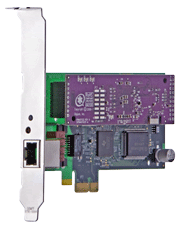
- La TE121P permite conectar 1 primario (E1/T1/J1) en un sistema que tenga slots PCI-Express (PCIe). Con esta, es la última tarjeta de primario que le faltaba a Digium para completar la familia de tarjetas PCI-Express. (Más información sobre la TE121P)
La TE122P es igual que la TE120P, de 1 primario (E1/T1/J1) con slot PCI (5v / 3.3V) con el añadido de traer soporte para el cancelador de eco por hardware VPMADT032. (Más información sobre la TE122P)
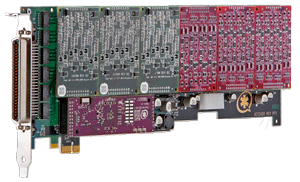
Por último, la AEX2400 es la nueva tarjeta analógica de hasta 24 puertos FXO/FXS con conector PCI-Express (PCIe) también con soporte de cancelador de eco por hardware VPMADT032. (Más información sobre la AEX2400)


Todas estas tarjetas ya vienen soportadas en el último paquete Zaptel 1.4.8 y 1.2.23